Architecture students ask a lot from a laptop. It needs to survive long studio days, handle everything from 2D drafting to 3D models, and preferably finish a render without sounding like it is about to take off. A good keyboard and a color-accurate display matter, too, because the same machine will probably be used for reports, Photoshop, Illustrator, and presentations.
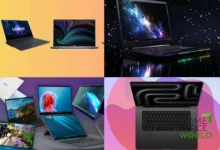
Of the four laptops here, the Lenovo ThinkPad P16s Gen 4 is the strongest overall choice, but only in the right configuration. The HP ZBook 8 G1ak is easier to carry, the ThinkPad E16 Gen 3 offers useful big-screen value, and the inexpensive Dell 15.6-inch Core i7 model is best kept to lighter coursework.
The quick list
- Lenovo ThinkPad P16s Gen 4 – Best overall: The only model here available with a genuinely useful discrete professional GPU.
- HP ZBook 8 G1ak – Best portable workstation: Well-built, compact, and available with a color-accurate display, but reliant on integrated graphics.
- Lenovo ThinkPad E16 Gen 3 – Best big-screen value: A practical 16-inch machine with upgradeable memory and storage; choose the screen and processor carefully.
- Dell 15.6-inch Core i7-1355U – Best for basic coursework: Fine for reports, Adobe work, and lighter 2D projects, but not a rendering laptop.
What should you look for in an architecture laptop?
For architecture and rendering work, Windows laptops usually give you more hardware for the money than Macs, especially around the $1,500–$2,000 mark. MacBooks are lovely machines for Adobe apps and general design work, and Rhino runs on both Windows and macOS. The catch is software compatibility and GPU rendering: Revit 2026 officially requires 64-bit Windows, while V-Ray’s GPU features depend heavily on the operating system and graphics hardware. If Revit, V-Ray GPU, or other Windows-first tools are central to your course, a capable Windows laptop is generally the safer buy.
I would look for at least a recent Core i7, Core Ultra 7, or Ryzen 7 processor, plus 32GB of RAM if the budget allows. For serious rendering, an RTX 4060/4070 or a comparable RTX Pro GPU is a much better starting point than integrated graphics. Workstation lines such as Lenovo’s ThinkPad P series and HP’s ZBooks are designed for professional applications, although a restrained gaming laptop….a Legion, Omen, or Zephyrus, for example, can also pull double duty remarkably well.
And don’t ignore the display. A fast processor does not make a dim 45% NTSC panel any nicer for Photoshop or Illustrator. Aim for at least 100% sRGB coverage; DCI-P3 coverage and factory calibration are welcome bonuses. Cooling matters just as much as the parts under the hood, since a thin laptop that throttles during a long render may not deliver the performance its specification sheet promises.
Our Top Laptop Picks for Architecture Students
Lenovo ThinkPad P16s Gen 4
The ThinkPad P16s Gen 4 is the clear front-runner here, but there is one configuration detail you absolutely should not miss. The Intel version can be fitted with an Nvidia RTX PRO 500 or RTX PRO 1000 Blackwell GPU, while the AMD version tops out at integrated Radeon 890M graphics. The AMD machine is no slouch for everyday modeling, but students buying specifically for rendering should choose the Intel model with discrete graphics.
Paired with a Core Ultra 7 H-series processor and 32GB of dual-channel memory, the RTX-equipped P16s has the right balance for Revit, Rhino, larger CAD assemblies, and GPU-assisted rendering. Memory can be expanded to 96GB, so the laptop has room to grow rather than becoming cramped as projects get more complex. That makes more sense for a four- or five-year architecture course than saving a little now and replacing the machine halfway through.
The display options are also unusually sensible. Skip the basic 45% NTSC panel and choose either the 500-nit, 100% sRGB IPS screen or the 3840 × 2400 OLED panel with 100% DCI-P3 coverage. Both are far better suited to visual work. You also get two Thunderbolt 4 ports, HDMI 2.1, Ethernet, a proper number pad, and the excellent ThinkPad keyboard.
It is still a 16-inch workstation, so it will never feel as effortless to carry as the ZBook below. A discrete-GPU configuration also bumps up the price and will draw more power under load. Even so, this is the only machine in the group I would comfortably recommend for students expecting regular 3D and rendering work without immediately pointing them toward a different laptop.
HP ZBook 8 G1ak
The ZBook 8 G1ak takes a different route. Rather than chasing maximum graphics power, it puts workstation build quality into a compact 14-inch chassis that starts at 3.17lb/1.44kg. An AMD Ryzen AI 7 PRO 350, 32GB of upgradeable DDR5 memory, and a 1TB SSD give it plenty of breathing room for multitasking, Adobe applications, 2D CAD, and moderate modeling. Some configurations step up to a Ryzen AI 9 HX PRO 375 and Radeon 890M graphics.
What holds it back is the lack of a discrete GPU. The Radeon 860M or 890M is capable integrated graphics, but it is not a substitute for an RTX chip when V-Ray GPU or long, complex renders enter the picture. Think of this as a mobile design workstation for students who spend more time drafting, editing, presenting, and moving between classrooms—not as a miniature render farm.
The 400-nit WUXGA option covers 100% sRGB, which is exactly the sort of detail cheaper laptops tend to get wrong. A 62Wh battery, two Thunderbolt 4 ports, HDMI 2.1, Ethernet, and a spill-resistant keyboard round out a genuinely practical package. If portability matters more than raw rendering speed, the ZBook fits the bill; otherwise, the RTX-equipped P16s is money better spent.
Lenovo ThinkPad E16 Gen 3
There are so many E16 Gen 3 configurations that choosing the laptop is almost easier than choosing the specification. The version I would target has an Intel Core Ultra 7 255H, 32GB of RAM, and the optional 2560 × 1600 display. That panel reaches 400 nits, covers 100% sRGB, and runs at 120Hz—a substantial upgrade over the duller 300-nit, 45% NTSC base screen.
The 16:10 display gives you useful vertical space for toolbars and drawings, and most Intel configurations provide two SODIMM slots plus room for a second M.2 SSD. The keyboard is comfortable, the port selection is generous, and the laptop starts at a reasonable 3.59lb/1.63kg despite its 16-inch screen.
But a cheap workstation, this is not. Every E16 Gen 3 uses integrated graphics, whether you choose Intel Arc or an AMD Radeon option. It is a solid pick for AutoCAD, SketchUp, Adobe work, and lighter Rhino projects, but serious rendering will expose its limits. AMD versions also come only with 45% NTSC displays, so anyone who cares about color accuracy should either choose the better Intel panel or budget for an external monitor.
Dell 15.6-inch Core i7-1355U
Let’s get one thing out of the way: the Core i7 badge does not make this Dell a rendering machine. The i7-1355U is a 15W processor with two performance cores, and this 16GB configuration relies on Intel Iris Xe graphics. It is responsive enough for research, Office, Photoshop, presentations, and modest 2D CAD, but complex Revit models and GPU rendering are well outside its comfort zone. The specification matches Dell’s Inspiron 15 3530 platform.
There are compromises elsewhere. Dell lists 16GB as the maximum supported memory, while the 15.6-inch FHD IPS panel reaches only 250 nits and 45% NTSC. That is acceptable for class notes but poor for color-sensitive design work.
If it is very inexpensive and your first-year workload is light, it can do the basics—especially with a good external monitor or access to a more powerful studio computer. For a full architecture degree, though, I would save for the E16 at minimum, and preferably the P16s with an Nvidia GPU.
Final verdict!
The ThinkPad P16s Gen 4 with Intel H-series processing, 32GB of RAM, a color-accurate display, and an RTX PRO GPU is the best-rounded architecture laptop in this group. The ZBook wins on mobility, while the E16 is a reasonable middle ground for students who need a large screen but can live without fast GPU rendering. The Dell is the budget fallback….not the machine to buy if Revit, V-Ray, and increasingly complex 3D projects are already on the syllabus.