The Best Laptops for Engineering Majors in 2026
Engineering students need enough processing power and memory to run demanding software, but they also need a laptop that can survive long days of classes. For most students, 16 GB of RAM and a 512 GB SSD should be the starting point. Mechanical, architectural, and AI students who regularly use GPU-accelerated software should also look for dedicated Nvidia graphics.
Because these laptops are sold in many configurations, the processor, display, memory, and battery can differ even when the product name is identical. Below, we specify the configurations worth looking for…and the compromises you should know about before buying.
Our Favorite Laptops for Engineering Students
Lenovo ThinkPad T14 Gen 4

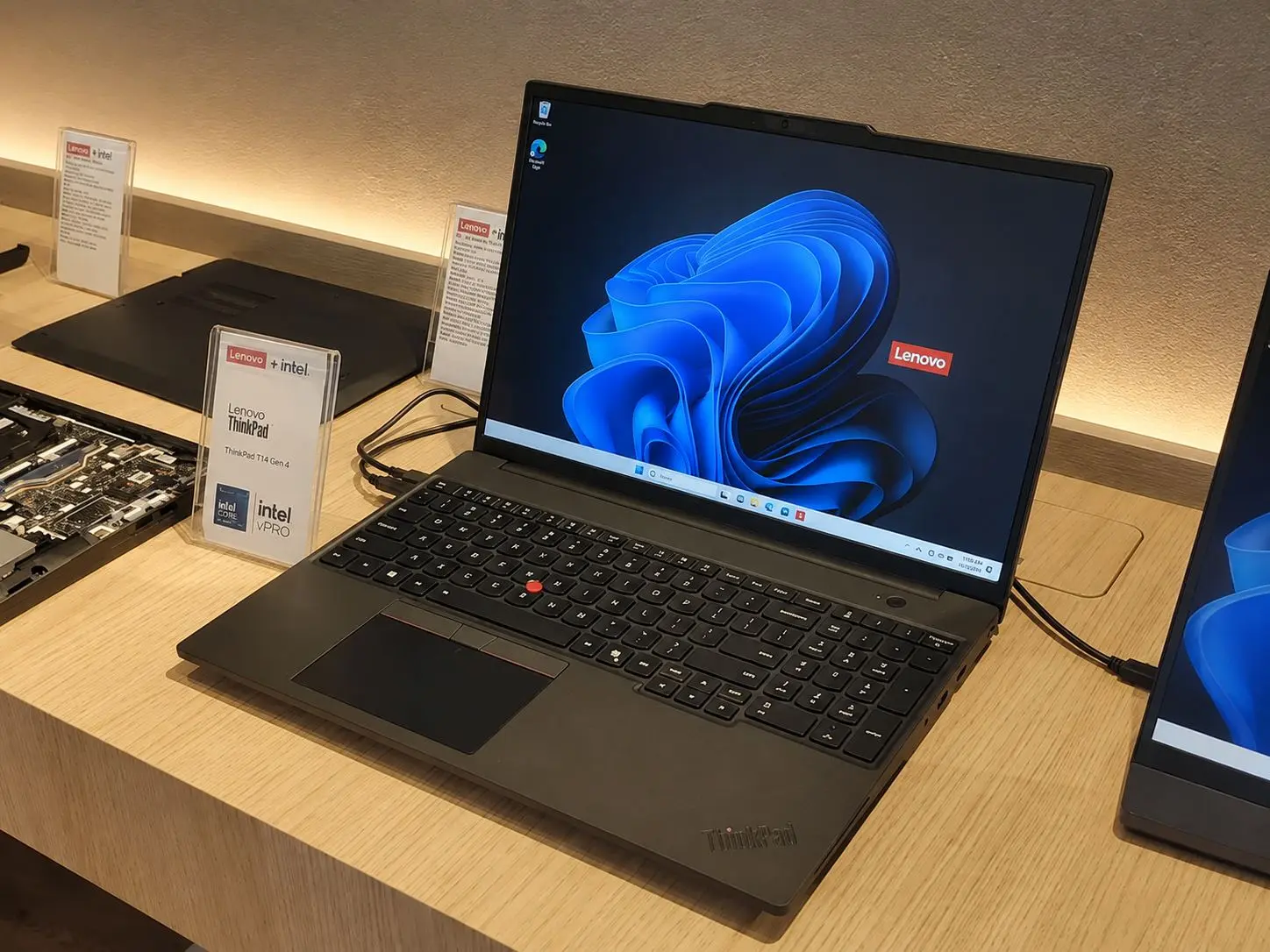
The AMD version of the Lenovo ThinkPad T14 Gen 4 offers the best balance of performance and portability for most engineering students today. A typical school day may involve compiling code, analyzing data in MATLAB, running circuit simulations, editing a CAD drawing, and keeping reference material open in several browser tabs. The T14 is powerful enough for these workloads without becoming as heavy or inconvenient to carry as a mobile workstation or gaming laptop.
We recommend the configuration with an eight-core AMD Ryzen 7 Pro 7840U processor, 32 GB of memory, and at least a 512 GB SSD. This combination gives students enough capacity to run an IDE, MATLAB, spreadsheets, and communication apps at the same time, while also leaving room for moderate simulations and virtual machines.
Its Radeon 780M integrated graphics are suitable for 2D CAD and moderate 3D projects, though not complex rendering or CUDA-based workloads. Two USB-A ports accommodate microcontroller boards and older lab equipment, while USB4, USB-C, HDMI 2.1, and Ethernet minimize the need for adapters. The T14 can also support three external monitors alongside its built-in display.
With the larger 52.5 Wh battery, the T14 starts at about 3.05 pounds, making it easy to carry across campus. We recommend the 400-nit, 100% sRGB WUXGA display because its 16:10 shape provides more room for code, CAD tools, and technical documents. The memory is soldered, however, so buy 32 GB from the start. Students working with large 3D models, machine learning, or GPU-heavy simulations should choose the Lenovo LOQ 15 instead.
Lenovo ThinkPad E14 Gen 5

If the ThinkPad T14 costs more than you can justify, the AMD version of the ThinkPad E14 Gen 5 provides many of the same practical qualities at a lower tier. A Ryzen 7 7730U configuration is suitable for coding, electronics software, data analysis, and lighter CAD projects, while the spill-resistant keyboard, Ethernet port, and two USB-C ports make it well suited to classrooms and engineering labs.
Unlike the T14, the E14 gives you a SODIMM slot and supports up to 40 GB of DDR4 memory. It also has two M.2 storage slots, making it the most flexible thin-and-light option here for students who want to upgrade their laptop gradually. Models with the 57 Wh battery start at roughly 3.11 pounds, and Lenovo reports up to 15.03 hours in MobileMark 2018 for its maximum-battery-life configuration.
The basic 300-nit display covers only 45% of the NTSC gamut, so we would pay more for the 2240-by-1400 panel with full sRGB coverage when available. The E14 also lacks the T14’s USB4 connection and faster Radeon 780M graphics. Still, its expandable memory, dual-storage design, and manageable weight make it a practical long-term choice for students who do not need a dedicated GPU.
Lenovo IdeaPad Slim 3

The Lenovo IdeaPad Slim 3 15ABR8 is a sensible budget option for first-year students whose work consists mainly of programming, spreadsheets, reports, and introductory engineering applications. Look for the Ryzen 7 7730U configuration with 16 GB of memory, a 512 GB SSD, and the 300-nit IPS display. It weighs about 3.57 pounds, includes USB-C with charging and DisplayPort support, and is rated by Lenovo for up to 10 hours in MobileMark 2018.
Make sure the listing specifies an IPS panel; Lenovo also sells this model with an inferior 250-nit TN screen. Even the IPS option covers only 45% of the NTSC color gamut, and the laptop’s memory is soldered and limited to 16 GB. The IdeaPad can handle ordinary coursework, but it leaves little room for future upgrades and is not a good choice for advanced 3D modeling or GPU-based computing.
ASUS Zenbook S 16 OLED
![HIDevolution [2024] ASUS Zenbook S 16 OLED UM5606WA White 16" 3K 120Hz Touch, 2.0 GHz Ryzen AI 9 365, Radeon 880M, 24 GB LPDDR5X RAM, 1 TB PCIe SSD, Windows 11 Home](https://m.media-amazon.com/images/I/41uRgtgK9mL._SL500_.jpg)
The ASUS Zenbook S 16 OLED is a rare 16-inch laptop that does not feel like a desktop replacement. It weighs 3.31 pounds and measures approximately 0.47 to 0.51 inch thick, giving students more screen space for code, drawings, and spreadsheets without adding the bulk of a gaming laptop. The configuration with an AMD Ryzen AI 9 HX 370, Radeon 890M graphics, 32 GB of memory, and a 1 TB SSD is the one we recommend.
Its 2880-by-1800 OLED display has a 16:10 aspect ratio, a 120 Hz refresh rate, and full DCI-P3 color coverage. Those specifications make it particularly appealing for architectural drawings, visual design, and students who often work with several windows at once. Two USB4 ports, USB-A, HDMI 2.1, and an SD card reader provide a better selection of connections than most thin premium laptops.
But the Zenbook’s beautiful screen and thin construction do not turn it into a mobile workstation. The Radeon 890M is still integrated graphics, and both the memory and the single SSD arrangement limit future upgrades. Its 78 Wh battery is reasonably large, but OLED brightness and processor-intensive applications can shorten runtime. Choose this model for portability and display quality….not as a substitute for an RTX-equipped laptop.
Lenovo LOQ 15

Some engineering programs change the laptop equation. If your courses involve complex SolidWorks assemblies, 3D rendering, machine learning, or GPU-accelerated simulations, the Lenovo LOQ 15AHP9 is the most capable option in this group.
The configuration to look for combines an AMD Ryzen 7 8845HS processor with an Nvidia GeForce RTX 4060 Laptop GPU. The RTX 4060 includes 8 GB of dedicated graphics memory and can operate at up to 115 watts when the laptop is paired with Lenovo’s 230 W adapter. This gives the LOQ substantially more graphics headroom than the integrated-GPU laptops above.
It is also easier to upgrade. Lenovo includes two DDR5 SODIMM slots and two M.2 SSD slots, allowing students to expand the memory or storage as their projects grow. We would start with at least 16 GB of RAM and upgrade to 32 GB for large CAD files, virtual machines, or simulation software.
The available 15.6-inch displays are better than those found on many inexpensive gaming laptops. Both the 144 Hz FHD panel and 165 Hz WQHD panel cover 100% of the sRGB gamut, but the sharper WQHD version provides more room for detailed interfaces and engineering drawings.
All that performance comes with an unavoidable portability penalty. The LOQ starts at 5.25 pounds, not including its large power adapter, and Lenovo rates its 60 Wh battery for only 5.4 hours in MobileMark 25. It is the model we would choose for demanding graphics work, but students who spend most of the day moving between classrooms will find the ThinkPad T14 much easier to live with.
How to Choose the Best Laptop for Engineering Students
Start with your course requirements, not the most powerful laptop you can afford. Programming, spreadsheets, circuit-design tools, and most first-year assignments can run well on a modern thin-and-light laptop. Complex CAD assemblies, 3D rendering, simulations, and machine-learning projects demand considerably more processing and graphics power.
Before buying, check the recommended….not merely minimum, requirements for the software your department uses.
Processor and memory
A recent Intel Core i5 or AMD Ryzen 5 is sufficient for general coursework, but a Core i7 or Ryzen 7 gives you more room for multitasking and longer projects. Efficient U-series processors are appropriate for coding, MATLAB, 2D CAD, and everyday academic work. For frequent rendering or simulation, look for an H-, HS-, or HX-series processor with stronger sustained performance.
Choose at least 16 GB of RAM. This is enough for most students to keep a development environment, browser tabs, documents, and a moderate engineering project open together. Consider 32 GB if you expect to use virtual machines, large datasets, detailed CAD models, or several demanding applications at once. If the memory is soldered, buy the capacity you will need for the full duration of your degree.
Integrated or dedicated graphics
Not every engineering student needs a dedicated GPU. Integrated graphics are adequate for programming, electrical engineering applications, 2D drafting, and lighter 3D work. Mechanical, architectural, AI, and design students should consider an Nvidia RTX 4050 or RTX 4060 laptop for smoother modeling, rendering, and GPU-accelerated calculations. Check whether your required software benefits from Nvidia CUDA or certified workstation drivers before paying for extra graphics power.
Storage and display
A 512 GB SSD is a practical minimum, while 1 TB is preferable if you keep large project files, datasets, virtual machines, or CAD libraries locally. An additional SSD slot is valuable because it lets you expand storage without replacing the original drive.
A 14-inch display provides the best portability, but a 15- or 16-inch screen gives complex interfaces and technical drawings more room. Look for at least a 1920-by-1080 resolution; a taller 16:10 screen is even better for code and documents. Students working with visual design should also prioritize an IPS or OLED panel with full sRGB coverage instead of choosing a laptop based on resolution alone.
Portability, battery, and connections
Performance is useful only if you can carry the laptop comfortably. Gaming laptops and mobile workstations provide more power, but their weight, shorter battery life, and large chargers can become inconvenient during a full day on campus. A lighter laptop is usually the better choice unless your coursework clearly requires dedicated graphics.
Finally, check for the ports used in your labs and dorm setup. USB-A, USB-C with charging and video output, HDMI, and Ethernet can reduce your reliance on adapters. Windows remains the safest option for broad engineering-software compatibility, but confirm your department’s operating-system and hardware requirements before committing.
Which One Should You Choose?
The Lenovo ThinkPad T14 Gen 4 is the best choice for most engineering students because it combines capable performance, useful ports, long battery life, and a lightweight design. Its integrated graphics are sufficient for programming, MATLAB, electronics software, and moderate CAD work, though students working with complex 3D models or GPU-accelerated applications should get the Lenovo LOQ 15 instead.
The other picks make sense for more specific needs. The ASUS Zenbook S 16 OLED provides a larger, better-looking display without becoming excessively heavy; the ThinkPad E14 Gen 5 offers more room for memory and storage upgrades; and the IdeaPad Slim 3 covers basic coursework for students on a tighter budget. Before choosing, confirm the software used by your department and buy enough memory for the entire degree….especially if the laptop cannot be upgraded later. The right engineering laptop is not necessarily the fastest one, but the model that can run your required programs without becoming too expensive or inconvenient to carry every day.